Relative Strength (RS) compares a stock’s price performance with a benchmark index (such as the NIFTY 50) to determine whether the stock is out-performing or under-performing the broader market.
What Relative Strength Actually Measures
Relative Strength compares:
- A stock’s price performance
- Against the market index (like NIFTY 50)
How to use Relative Strength in Chartink
For example RSI indicator:
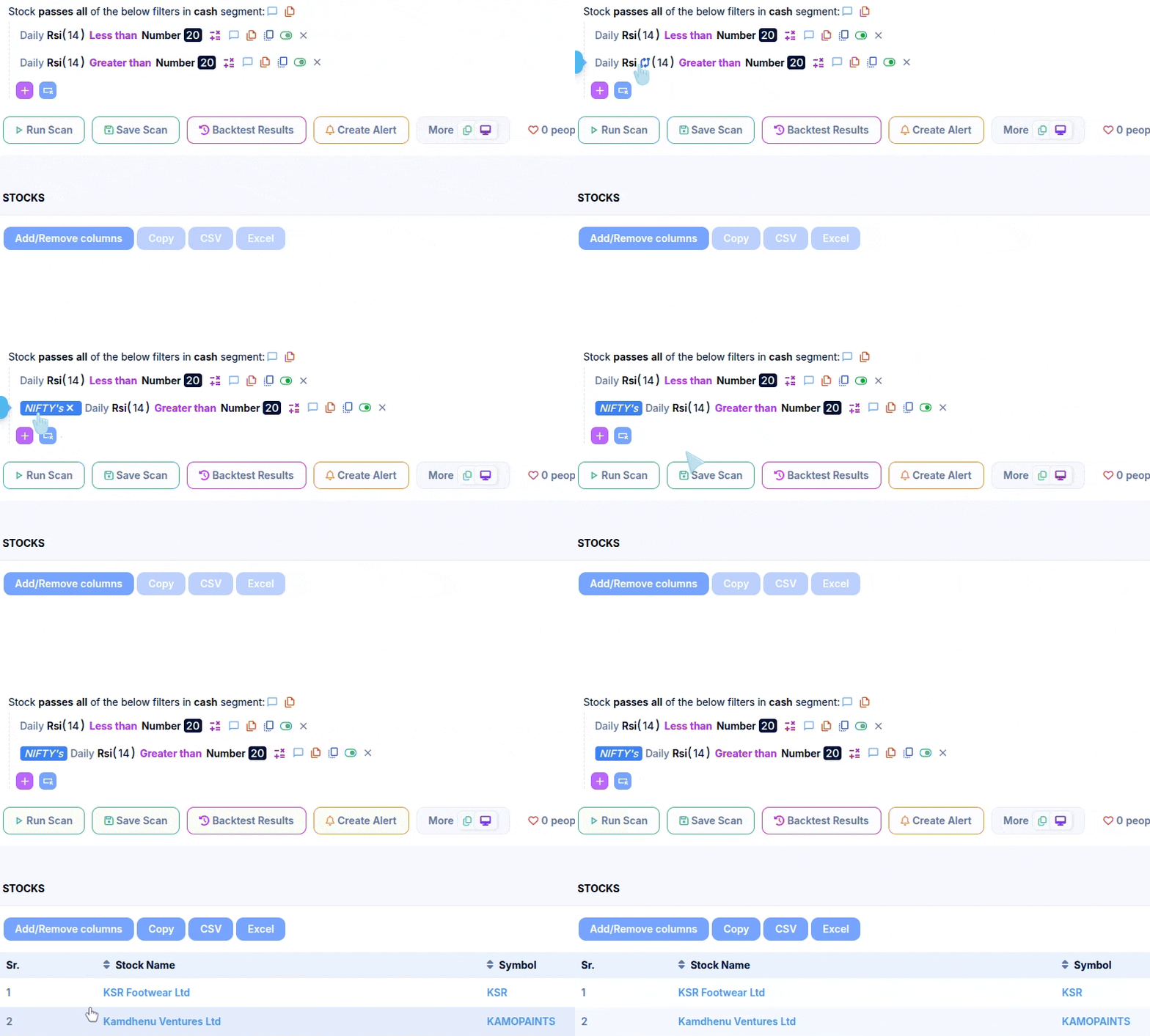
- A stock may show weakness on its own(RSI below 20)
- While the market remains relatively strong(RSI above 20)
Example scan: Stocks under-performing NIFTY
Relative Strength Formula with Example
One practical way to measure Relative Strength is by comparing the RSI (Relative Strength Index) of a stock with the RSI of the benchmark index.
Formula: Relative Strength (RS) = Stock RSI − Index RSI
Example Dashboard: TCS x NIFTY

Using the example data:
- Stock (TCS) RSI: 55.30
- Index (NIFTY) RSI: 48.93
- RS(TCS x NIFTY): +6.37 (The benchmark RSI, not a derived value.)
Since the Relative Strength value is positive, it indicates that TCS is performing better than the NIFTY index at that time.
If Stock RSI > Index RSI → Relative Strength
If Stock RSI < Index RSI → Relative Weakness
Relative Strength Using 52-Week Price Performance
Relative Strength can also be calculated using 52-week price performance, which is commonly used for medium- to long-term stock selection.
This approach normalises a stock’s price performance against the index over the same period.
Formula (52-Week Performance-Based RS)
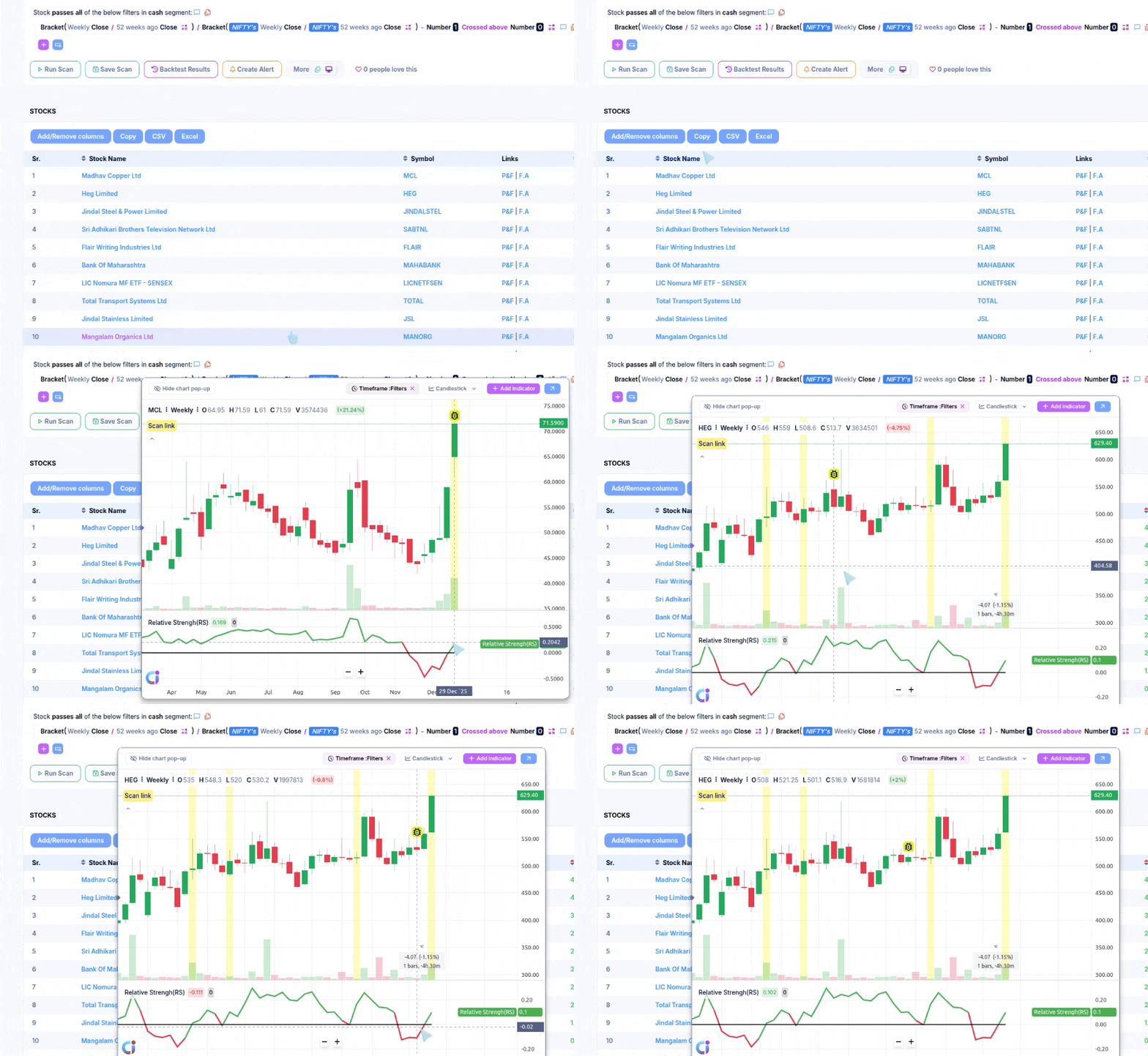
Relative Strength (RS) = (Stock Close ÷ Stock Close 52 Weeks Ago) ÷ (Index Close ÷ Index Close 52 Weeks Ago) − 1
Example scan: Stock with RS positive w.r.t NIFTY 50
Chart Snapshot: Relative strength on Chart
How to Interpret 52-Week RS
- RS above 0 → Stock has outperformed the index
- RS below 0 → Stock has underperformed the index
Relative Strength Using 5-Day Performance Ranking vs NIFTY
This is another method of applying Relative Strength (RS), where stocks are ranked based on their price out-performance versus NIFTY over the last 5 trading days.
Example Dashboard: Top-10 stock Outperform stocks
Relative Strength comparisons must use the same indicator and timeframe for both the stock and the index.
- Stock RSI vs Index RSI → ✅
- Stock 15 minute MACD vs 15 minute Index MACD → ✅
- Stock Close vs Index Close → ✅
- Stock RSI vs Index MACD → ❌ not logically correct
- Stock RSI (Daily) vs Index RSI (15-min) → ❌ not logically correct
Only the instrument should differ (stock vs index); the measurement method must remain identical.
this is excellent future to identify strong stocks. however, issue is if a stock listed later than 52weeks also considered and giving wrong results. how to overcome this issue.
Hello,
If the stock is listed within the 52-week, then it would not be included. The scan will not show that stocks. However, please let us know if you wish to include the stocks that are listed within 52 weeks, too.
hello
I would be great if a flexibility can be provided instead of rigidly sticking to 52 week. Can we tweak the same formula to derive RS say over 50 days
Hello,
We have created the scan. Kindly review.
https://chartink.com/screener/stock-outperforming-nifty-over-50-days
Hi, can you provide the scanner link?
Hello,
We have created the scan. Kindly review.
https://chartink.com/screener/stock-with-rs-positive-w-r-t-nifty-50-i-e-outperform-nifty-50-in-52-weeks
please I want to create new scanner bellow condition met.
Prev day range (Prev day high -Prev day low) range grater than Prev day range high.
Prev day range (Prev day high -Prev day low) range less than Prev day range low.
example. Prev day high 100 and low is 80 ( Prev day range 20rs). next day high +20 (120rs) or low-20 (60rs ) met condition i want alert.
please help i am regular subscriber …
Hello,
We have created the scan. Kindly review.
https://chartink.com/screener/price-above-1-day-ago-range-1-day-ago-high
Can you provide the scanner based on recent high made by index?
For Example: Nifty has made a recent high on 03 feb 2026, since then Nifty is falling continuously, so I want to compare the stock based on dates which is 03 feb 2026, I want to check the relative strength of a stock based on dates here 03 feb 2026.
Hello,
This can be done with the help of a custom indicator/formula. Here is an example scan for your reference: https://chartink.com/screener/roc-increasing-compare-from-3rd-feb-with-nifty
Note: The above scan will show you the % change between the today’s close and the 3rd feb close of stock is above the NIFTY index. For tomorrow, you can use the ROC 25 instead of 24 to get the accurate results and so on.
To use this custom indicator, you can “Copy scan” scan & make changes. You can view the logic of the custom indicator by clicking on the purple sign(>>) next to the indicator.
Also, you can create your own custom indicator by copying/pasting the logic from the indicator shared here https://chartink.com/indicator
Once you create your custom indicator, it should be visible in the dropdown list under “derived/custom indicators”. Here is a short video on how this can be done.: https://drive.google.com/file/d/1bnr1ahmajyXIpBRE69ese60sm7541-14/view?usp=sharing
hi . i am regular user. do you provide screener to outperforming sector? is it possible?
or any other option
Hello,
We don’t have the feature for the same. However, we provide the feature where the stocks outperform the indices. We have created the scan. Kindly review.
https://chartink.com/screener/stock-outperforming-nifty-daily-time-frame
HELLO,
YOU GUYS ARE DOING GREAT WORK, I AM YOUR REGULER SUBSCRIBER. I HAVE A REQUEST FOR A SCREENER WHICH CATCHES THE SECTOR ROTAION AT EARLIEST, PLEASE! THANKS IN ADVANCE.
Hello,
Thank you for your appreciation and kind words. Apologies, but I’m afraid that your message isn’t entirely clear. Could you please provide more details on what you are referring to? It would be helpful if you could share an example image for reference purposes. This way, we can better understand your request and create a scan that meets your requirements. Kindly share the details to this email ID: [email protected]